
ESX Virtualization

VMware ESXi, vSphere, VMware Backup, Hyper-V... how-to, videos....

Nakivo Backup and Replication - #1 Backup solution for Virtual, physical, cloud, NAS and SaaS

Menu
  • Certification
      • VCP-VVF Administrator
          • vcp-vvf-2.
        • Close
      • VCP-DCV vSphere 8
          • vcp2024-125.
        • Close
    • Close
  • VMware
    • Configuration Maximums
    • vSphere
      • VVF 9 and VCF 9
      • vSphere 8.0
      • vSphere 7.0
      • vSphere 6.7
      • vSphere 6.5
      • vSphere 6.0
      • Close
    • VMworld
      • VMware EXPLORE 2024
      • VMware EXPLORE 2023
      • VMware EXPLORE 2022
      • VMworld 2019
      • VMworld 2018
      • VMworld 2017
      • VMworld 2016
      • VMworld 2015
      • VMworld 2014
      • VMworld 2013
      • VMworld 2012
      • VMworld 2011
      • Close
    • Close
  • Proxmox
    • Proxmox
    • Close
  • Microsoft
    • Windows Server 2012
    • Windows Server 2016
    • Windows Server 2019
    • Windows Server 2025
    • Close
  • Categories
    • Tips – VMware, Microsoft and General IT tips and definitions, What is this?, How this works?
    • Server Virtualization – VMware ESXi, ESXi Free Hypervizor, VMware vSphere Server Virtualization, VMware Cloud and Datacenter Virtualization
    • Backup – Virtualization Backup Solutions, VMware vSphere Backup and ESXi backup solutions.
    • Desktop Virtualization – Desktop Virtualization, VMware Workstation, VMware Fusion, VMware Horizon View, tips and tutorials
    • How To – ESXi Tutorials, IT and virtualization tutorials, VMware ESXi 4.x, ESXi 5.x and VMware vSphere. VMware Workstation and other IT tutorials.
    • Free – Free virtualization utilities, ESXi Free, Monitoring and free backup utilities for ESXi and Hyper-V. Free IT tools.
    • Videos – VMware Virtualization Videos, VMware ESXi Videos, ESXi 4.x, ESXi 5.x tips and videos.
    • Home Lab
    • Reviews – Virtualization Software and reviews, Disaster and backup recovery software reviews. Virtual infrastructure monitoring software review.
    • Close
  • Partners
    • NAKIVO
    • StarWind
    • Xorux
    • Close
  • This Web
    • News
    • ESXi Lab
    • About
    • Advertise
    • Archives
    • Disclaimer
    • Privacy policy
    • PDFs and Books
    • Close
  • Free

Nice Free alternative to manage MySQL and MicrosoftSQL Databases

By Vladan SEGET | Last Updated: February 19, 2017

Shares

A nice alternative for working with SQL and MySQL databases called HeidiSQL. The utility is a donationware and the creator of the tool, Ansgar Becker provides it as an OpenSource – free utility. A very handy IMHO as you can create and save several logins/passwords within the utility as you probably manage several SQL or MySQL dbs.

I think that there is a slight learning curve of the utility as its beefed with many many functions. I quickly saw an export as sql file possibility which is handy before anything goes wrong.

There are 32 bit version as well as 64bit versions of the utility. A Portable version exists as well in case you want to carry the tool on your USB stick only.

Quote from HeidiSQL.com site:

HeidiSQL is an easy-to-use interface and a “working-horse” for web-developers using the popular MySQL-Database. It allows you to manage and browse your databases and tables from an intuitive Windows interface.

It enables you to browse and edit data, create and edit tables, views, procedures, triggers and scheduled events. Also, you can export structure and data either to SQL file, clipboard or to other servers.

System Requirements:

  • HeidiSQL runs fine on Windows (XP, Vista, 7, 8) and – with Wine – on any Linux and newer MacOS X versions.
  • If you're using Windows 64 bit and if you have a 32bit version installed in C:\Program Files (x86)\…, then the 64bit version is installed separately, and can be uninstalled separately. You should uninstall the 32bit version in that case.

A quick screenshot showing connection to Microsoft SQL database:
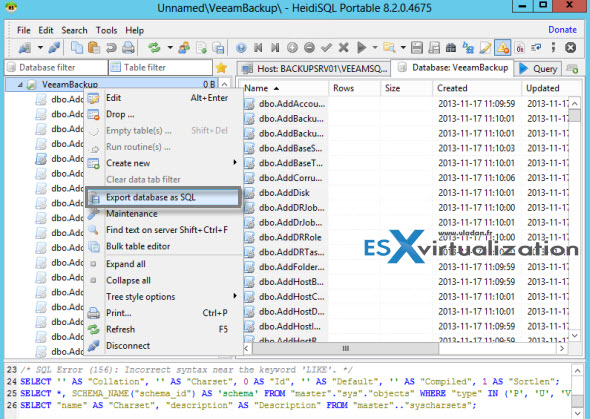
HeidiSQL - OpenSource utility for managing MySQL and Microsoft SQL databases

Features List:

  • Free for everyone, OpenSource.
  • Connect to multiple servers in one window
  • Connect to servers via commandline
  • Connect via SSH tunnel, or pass SSL settings
  • Create and edit tables, views, stored routines, triggers and scheduled events.
  • Generate nice SQL-exports, compress these afterwards, or put them on the clipboard.
  • Export from one server/database directly to another server/database
  • Manage user-privileges
  • Import text-files
  • Export table rows as CSV, HTML, XML, SQL, LaTeX, Wiki Markup and PHP Array
  • Browse and edit table-data using a comfortable grid
  • Bulk edit tables (move to db, change engine, collation etc.)
  • Batch-insert ascii or binary files into tables
  • Write queries with customizable syntax-highlighting and code-completion
  • Pretty reformat disordered SQL
  • Monitor and kill client-processes
  • Find specific text in all tables of all databases of one server
  • Optimize and repair tables in a batch manner
  • Launch a parallel mysql.exe command line window using your current connection settings

The tool can be downloaded from this page here.

Vote !
Shares

| Filed Under: Free Stuff Tagged With: manage MySQL and MicrosoftSQL

About Vladan SEGET

This website is maintained by Vladan SEGET. Vladan is as an Independent consultant, professional blogger, vExpert x17, Veeam Vanguard x11, VCAP-DCA/DCD, ESX Virtualization site has started as a simple bookmarking site, but quickly found a large following of readers and subscribers.

Connect on: Facebook. Feel free to network via Twitter @vladan.

Private Sponsors


Featured

  • Thinking about HCI? G2, an independent tech solutions peer review platform, has published its Winter 2023 Reports on Hyperconverged Infrastructure (HCI) Solutions.
Click to Become a Sponsor

Most Recent

  • Reviving Old School Laptops with PrimTux: Battling Obsolescence on a Budget
  • Proxmox Datacenter Manager 1.0 released – a real vCenter Server Alternative?
  • Recovering a Corrupted Exchange Database with Stellar Repair for Exchange
  • Commvault at AWS re:Invent 2025: Pioneering AI-Enhanced Cyber Resilience with Cloud Unity
  • How to Set Up pfSense Community Edition as a Firewall Using VMware Workstation Pro 17 (2025 Edition)
  • HPE Morpheus VM Entreprise and Morpheus VM Essentials updates released – v8.0.11
  • Veeam Backup and Replication Upgrade on Windows – Yes we can
  • Commvault’s Cloud Unity Platform: Revolutionizing Enterprise Resilience in the AI Era
  • Securing Your Backups On-Premises: How StarWind VTL Fits Perfectly with Veeam and the 3-2-1 Rule
  • 3 New Advanced Certifications from VMware/Broadcom Released

Get new posts by email:


Deals

Support us on Ko-Fi


Buy Me a Coffee at ko-fi.com

VMware Engineer Jobs

VMware Engineer Jobs

YouTube

…

Find us on Facebook

ESX Virtualization

…

Copyright © 2025 ·Dynamik-Gen · Genesis Framework · Hosted with HostColor.com
